Are you looking for the login and setup for 1and1 webmail? or use www.ionos.com to access 1&1 webmail? You’ve come to the correct place! Let me explain what IONOS is if you’re not sure. You will learn everything there is to know about 1and1webmail login in this article. Oneand1 IONOS offers the webmail service known as IONOS webmail. This service allows you to create an email domain for your business or personal brand. if you lack the knowledge! You can use this article to your advantage.

There was once a period when opening your own firm was difficult. A business needs a website, email, website builder, and many other things. But now, the procedure is quite simple.
There are numerous businesses that offer email hosting and domain registration services. In this essay, we’ll focus exclusively on 1and1 IONOS.
In 1988, 1and1 IONOS, a web hosting business, was founded in Germany. Their webmail services are available for as little as $1 per month. All you need to use this service is a web browser and a reliable internet connection. Creating a 1&1 webmail account is simple. This post will go over everything you need to know about 1and1 webmail services, including how to log in and how to set it up.
What is 1and1 Webmail?
1and1 webmail is a webmail service offered by the 1and1 IONOS. It is no different from email. 1&1 webmail is a web-based email service. You don’t need anything other than a web browser and a stable internet connection. It helps you access your email from anywhere in the world. It also helps you choose your custom domain.
Also, read How to Fix iPhone 14 Pro Camera Shaking bug easily?
1&1 Webmail enables you to have a custom email domain as well. This gives your emails a trustworthy and decent look in front of your clients. You can also create your own folders and manage your contacts, calendars, and appointments in one place. Now that we know what 1and1 webmail is let us look at the 1and1 webmail login and setup process.
What are the Requirements for 1and1 Webmail Login?
A few things are required before you set up or log in to a 1and1 webmail. These are very basic requirements that you must know. Here are the things you require to get the benefits of the 1&1 Webmail service:
- A web address, i.e. 1and1 webmail browsing address.
- Webmail’s customer ID.
- Webmail’s Email ID and password.
- An internet browser.
- An electronic device like a smartphone, computer, laptop, tablet, etc, to access their service.
- A stable internet connection.
How to Set Up a 1and1 Webmail Login Account?
I have told you the requirements for setting up a webmail account. You can easily set up a 1and1 webmail account to fulfill these requirements. It is an easy process and does not require much technical knowledge.
Also, read How to Find Out What Motherboard You Have | Secret Tips & Tricks
Here is a step-by-step guide to help you set up a 1and1 webmail account:
1. Go to a web browser, you can use any browser on your device.
2. Go to the official website of IONOS.
3. Click on Email and Office on the header of the website.

4. You will see a Professional Email Address on your screen, click on it.

5. Go to the plans section.
6. You will see three different plans:
- Mail Basic 1 ($1/month)
- Mail Basic 1+ ($4/month)
- Mail Business ($5/month)

7. Select the plan that suits your need and Click on Continue under it.
9. Now, type the web address you want in the search box. Click on Check.
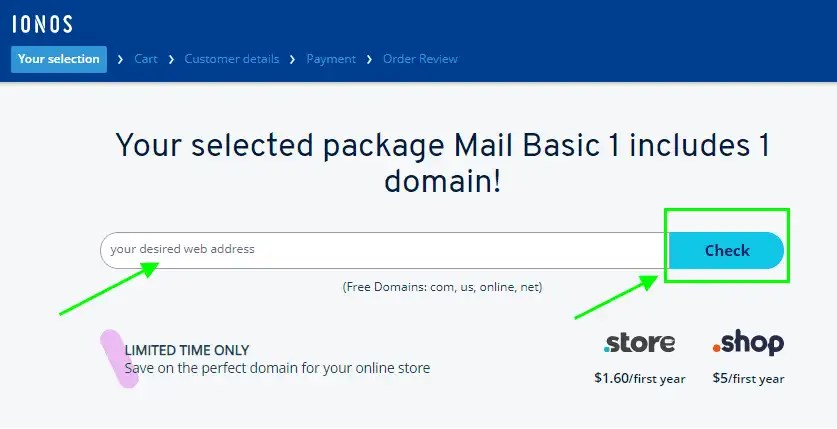
10. If your desired web address is available, register it. (If it is not available, you will be suggested similar names. Select the one you like.
11. Tap on Add to Cart. Click on continue.

12. Now click on Continue to Checkout.

13. You will be redirected to a new page. Enter the required details there.
14. Click on Continue to Payments Options.

15. Complete your payment, and you are all set!
Note: If you want to receive your 1&1 account email on your Gmail, Yahoo, or Rediff, you must choose the Automatically Forward Option.
Also, read How to get iPhone 14 Pro’s Dynamic Island on any Android: Quick and Easy!
How does 1and1 Webmail Login work?
After fulfilling the requirements and setting up a 1and1 webmail account, the next thing is to log in. It is as easy as setting up the account. There are two ways through which you can log in to a 1&1 webmail account. Here is a step-by-step guide to Login into the 1and1 webmail at www.ionos.com:
How to Login 1and1 Webmail by Sign-in Option
Here is one way you can log in to the 1and1 webmail:
1. Go to the official site of IONOS.
2. Click on the Sign-in option in the top right corner.

3. You will be redirected to a new page.
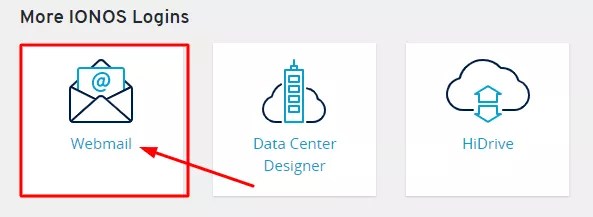
4. Scroll down and click on Webmail under More IONOS Logins.
Also, read How to quickly translate text in The Camera App in iOS 16?
How to Login 1and1 Webmail by Remember Me Option
Here is the second way you can log in to the 1and1 Webmail account:
1. Go to the IONOS webmail site.
2. Enter your registered email address and password.
3. Click on Remember Me.
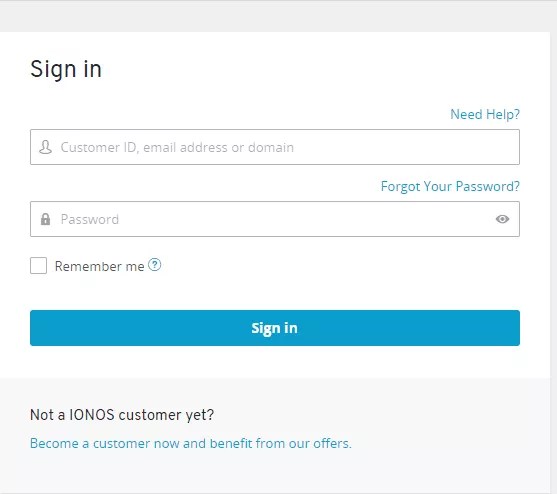
4. Tap on Login.
Also, read How to Instantly Remove Background from Any Image in iOS 16?
How to Reset 1 and 1 Webmail Login Password?
In today’s time, everyone is using a lot of applications. It gets hard to remember the password of everything. In case you have lost your 1&1 Webmail password, you can reset it using these simple steps:
- Go to the official site of IONOS.
- Click on the Sign In option.
- You will be redirected to a new page.
- Click on Forgot your login details.
- Now, type your Customer ID, Email address, or Domain, and click on Request New Password.
- You will get a reset link.
- Choose a new password.
- Click on Save changes.
Note: Some requirements for 1and1 webmail password:
- Must be 12 characters long.
- Should include numbers.
- Should include uppercase.
- Should include lowercase letters.
- Use special characters.
Also, read How to import RSS feeds into Tumblr [updated 2022]
How to Keep Your 1 and 1 Webmail Login Account Safe?
Now that you have set up your 1and1 webmail account, you need to know how to keep it secure. You share a lot of important information via your webmail. This information can easily get hacked now that password-cracking tools are easily accessible to everyone. To protect your data from being lost or hacked, you can follow these security tips to keep your 1&1 webmail account safe:
- Create a strong password: Use Upper case letters, numbers, and special characters to create a strong password.
- Don’t use a guessable password: The password should never be your phone number, birthday, any anniversary, etc.
- Change your password once a month: This is a hassle but a lifesaver. You should get into the habit of changing your password once a month to protect it from getting hacked.
- Use Tools: There are a lot of tools available online that save your passwords, like LogMeOnce, Dashlane, etc. These tools will help you to keep your passwords safe.
How to Contact 1and1 Webmail Login Customer Support?
I have told you everything regarding how you can keep your 1 and 1 webmail secure. However, if there is any other difficulty you face, you can contact the Support team of 1&1 webmail. The support team will help you with everything from 1and1 webmail login to resetting the password. They are available 24×7.
You can contact them with their official number or email.
Phone number: 1-484-254-5555
Email: [email protected]
Also, read How do I activate the DFU mode on an iPhone or iPad?
Is there any 1and1 IONOS email app?
Yes, there is an app. You can download the app for both Android and iOS.
You can download the app here:
| Platform | Download Links |
| Android | Click Here |
| iOS | Click Here |
1. What’s the difference between IMAP and SMTP?
The short answer is that IMAP connects to your email providers’ server and is used for receiving email while SMTP is used for sending mail to other servers.
IMAP (Internet Message Access Protocol) is a protocol that requests that your email provider will save all of your messages and folders onto its own servers. This way, whether you are using an email client or webmail, you will be able to connect to your email account and view anything you have received because it’s always stored on their server.
STMP (Simple Mail Transfer Protocol) is the protocol for sending emails out of your account to other destinations. It enables your email client to connect to the server of your provider to send outgoing mail, especially to other servers.
2. Does Mailbird Support IMAP? / Does Mailbird Support POP3?
Yes. Mailbird uses IMAP or POP3 to connect to most email providers. Mailbird’s technology can detect the server settings automatically when you enter your email address.
If it is unable to detect the settings, you can set up your email manually by entering the details your provider has listed for their server settings: like the IMAP or POP3 Port and IMAP or POP3 Security.
You will also need to enter the username and password you have assigned with your email provider.
3. What does ‘port’ mean in my email settings?
You can think of the ‘port’ like an address number. The same way that an IP address identifies the location of a computer, the port identifies the application operating on that computer.
There are a few common port numbers, always use the recommended settings to configure your email server to Mailbird.
4. How do I know if I need POP3 or IMAP?
If it is important to you to save space on your desktop, or if you’re worried about backing up your emails, select IMAP. This means that your emails will be stored on the server of your email provider.
POP3 will download your emails to be stored locally and then delete them from the server. This will free up space on your server, but if anything happens to your local storage, those emails won’t be available online. If you are comfortable exclusively having a local copy of your files, POP3 is a viable option.
5. Can I set up Mailbird for Mac?
Mailbird for Mac is on it’s way! Unfortunately, Mailbird is not yet available for our friends using Apple devices. If you’d like to be kept in the loop on Mailbird for Mac, click here.
6. How can I import my old emails?
If your old emails are still available in your account, they will automatically be imported. IMAP protocol syncs your emails and folders with the email server, making it possible to manage your emails on any device that is connected to your account.
Once you add your 1and1.com account to Mailbird, it will grant you access to your emails immediately, no further action is required.
Note: If your emails are from your local server, it won’t be possible to import them because of IMAP protocols.
7. How can I manually set up 1and1.com on Mailbird?
This page will walk you through setting up an email account to Mailbird. Step 6 refers to the manual process.
8. How does Mailbird protect my privacy?
Our Privacy Policies and Terms of Use are 100% compliant with the European General Data Protection Regulation (GDPR) as of 25 May 2018.
Mailbird cannot ever read any of your personal information. This includes your emails, attachments, and account passwords. Mailbird is a local client on your computer and all sensitive data is never shared with Mailbird or anyone else.
You may contact us directly at any time to review or opt out of the information we hold that pertains to you and your account. Please write to [email protected].
Wrapping Up
Time to end the discussion. A cost-effective website to examine web domains and handle your emails is 1and1 webmail. Their service is available for a monthly minimum of $1. I’ve made an effort to explain the IONOS webmail login process and setup in this article. I hope you were able to find what you needed. Please leave a comment if you have any additional questions on this subject!