This is beneficial to you if you have a strong enthusiasm for sports and performance. To play games that are loaded and run quickly, you will need a nice monitor. The greatest gaming monitors are currently available from numerous stores. G-Sync technology, which is particularly advantageous for gamers, is present on these displays. Your monitor’s performance depends on a variety of variables, including response time, refresh rate, contrast ratio, and more. Therefore, G-Sync is one of the aspects that can determine whether or not your monitor is ideal for gaming. So let me demonstrate whether Are G-Sync monitors worth it or not.

G-Sync can entirely remove screen tearing without impairing your monitor’s performance. Although G-Sync is not the only technology that can be of assistance to you, it is undoubtedly the most well-known. Therefore, if you are utilizing G-Sync, you can rest easy knowing that there won’t be any screen rips on your display. This justification is insufficient to convince you to purchase a G-Sync display or assess its value. due to the higher price of G-Sync monitors compared to comparable monitors.
It balances the computer’s refresh rate and frame rate, but you should always consider your options before making a choice. In this essay, I’ve answered any question you might have about G-Sync and VRR technology. Additionally, you can find out exactly how to activate G-Sync. You will therefore learn whether G-Sync is worthwhile or not.
The majority of most G-SYNC monitors are not worth it.
In many circumstances, you could just purchase a better display that is FreeSync/G-SYNC Compatible for the extra money you would have spent on a G-SYNC monitor as opposed to its Adaptive-Sync cousin.
Is G-Sync Worth It?
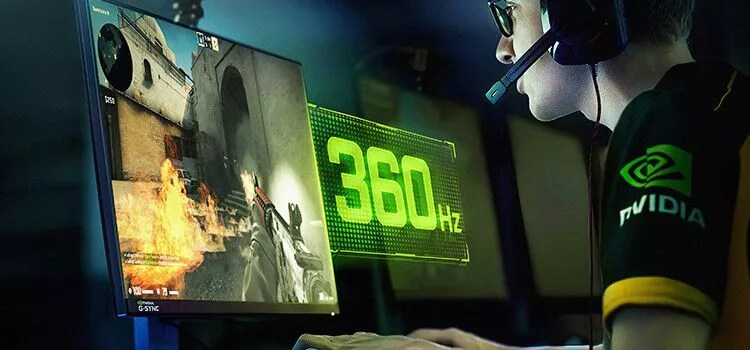
Now, you have an idea of G-Sync. This is an amazing technology for all passionate gamers. However, we have to consider whether G-Sync is worth it or not. When we think about G-Sync we have to also look for one more thing, which is VRR technology.
Basically, G-Sync technology can improve your in-game experience, but it is not free. So, it is very important to decide whether G-Sync is worth it or another VRR technology is worth it, which is also called Free-Sync technology.
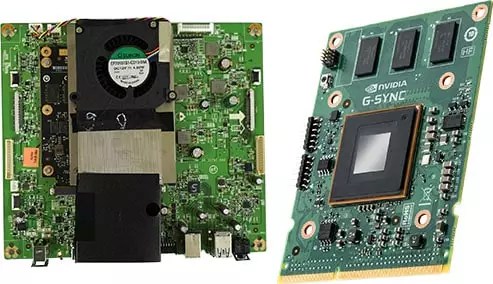
G-Sync is not free. So first, you need to know everything about it so you can decide if you want to buy it or not. G-Sync monitors are much more expensive than Free-Sync because they have proprietary hardware inside. I will explain everything about G-Sync so let us discuss what G-Sync basically does.
Also, read How to Instantly Remove Background from Any Image in iOS 16?
What is VRR?
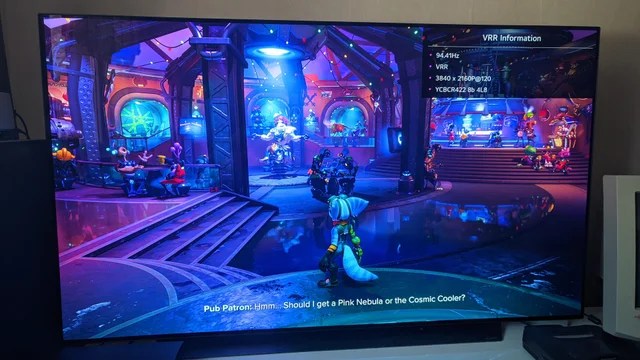
To know more about G-Sync, you need to understand what VRR is because both things are connected with each other. Before you think Is G-Sync worth it, you need to think about VRR. If you regularly play games on PC and if you have played games on non-G-Sync and non- Free-Sync monitors, then you must know about ‘screen tear’.
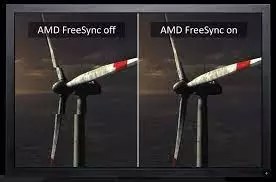
Screen tear means when your displayed pictures appear in two parts on the screen. Then the top portion of the screen looks slightly off from the bottom portion of the screen. This thing happens because of the graphic card. Basically, your graphic card skips the frame rate and does not sync up with the picture which your screen displays. Whenever your frame rate and refresh rates are not synced up with each other properly, your monitor tries to draw pictures on the screen, but it fails.
Also, read How to import RSS feeds into Tumblr [updated 2022]
A monitor receives a new frame after that for the display. So, VRR technology is very important for your PC. It checks that your frame rates and refresh rates are synced or not and avoids screen tears for you. After understanding everything about VRR, let us move forward to whether should I get G-Sync or not.
What Does G-Sync Do?
G-Sync technology basically uses NVIDIA hardware. There is one scaler which is inside the monitor, which helps to control the refresh rate. When your GPU is paired with NVIDIA software it can balance the refresh rate and maintain the sync process with the frame rate so that your GPU can perform better.
If you want to use G-Sync technology on your monitor, you do not need to purchase an expensive graphic card. You should use an NVIDIA GPU of 600- series or later than that for your monitor. The graphic card is very important when it comes to G-Sync technology. G-Sync technology is not for those, who are using an older NVIDIA card or an AMD one.
Also, read How do I activate the DFU mode on an iPhone or iPad?
You will be happy to read that now the upgraded G-Sync monitors are compatible with AMD cards. You need to check whether your monitor is compatible with G-Sync or not for that NVIDIA provides a list of all G-Sync, G-Sync Ultimate, and G-Sync Compatible monitors. So, I hope you have an idea now of what G-Sync is, and is G-Sync worth it.
How to Enable G-Sync?
Now, if you are aware of exactly what G-Sync is and what does G-Sync do, you do not need to worry about fixing it up with your monitor. Enabling G-Sync is very simple; you just need two things for it: a good G-Sync capable graphics card and another one is a G-Sync monitor. In fact, NVIDIA provides a complete guide on how to enable G-Sync on your own easily. If you are still finding trouble enabling G-Sync, I have mentioned some easy steps below.
- Open your NVIDIA Control Panel first.
- Now click on Set up G-Sync.
- Now choose the Enable G-Sync option.
- To enable G-Sync, select the name of the monitor.
- Now select the Apply option.
- Restart your PC and you are enabled with G-Sync.
Also, read How do I set up 1and1.com email with IMAP | How to Login at www.ionos.com in 2022
Here are some examples.
Full HD G-SYNC Monitors

The cheapest G-SYNC monitor is the Acer XB241H. It’s a 1080p 144Hz (overclocks to 180Hz) display with a TN panel and 1ms GtG response time. It goes for $350 – $400.
Is it worth it?
No — because at that price range, you can get a 1080p 240Hz IPS gaming monitor with FreeSync/G-SYNC Compatible, which would provide you with a significantly better image quality and smoother performance.
So, what about 1080p 240Hz monitors with G-SYNC?
Well, since it’s mostly competitive gamers who pick 240Hz displays, G-SYNC is not worth the extra ~$150 as they usually prefer to play with uncapped frame rates (over 240FPS which disables VRR) for minimal input lag.
At such high refresh/frame rates, screen tearing is barely visible, too. And if they want to play some more demanding games as well, regular VRR will do just fine here as most 1080p 240Hz IPS models have excellent overdrive implementations and a wide enough dynamic range to support LFC (Low Framerate Compensation).
A lot of competitive FPS gamers also prefer a good implementation of Motion Blur Reduction to VRR, such as that of the ViewSonic XG2431.
The same applies to 1080p 360Hz monitors.
For instance, the Acer Aopen 25XV2QF with FreeSync is not only 200 cheaper than the G-SYNC variants, such as the Dell AW2521H – it also offers better MBR implementation and an overclockable refresh rate of 390Hz, all while having just as good image quality, pixel response time and VRR performance!
Quad HD G-SYNC Monitors

Another good example is the Acer XB271HU 1440p 144Hz IPS gaming monitor with G-SYNC, which goes for ~$500. For the same price, you can get the MSI MAG274QF-QD with a newer IPS panel that boasts a wider color gamut and a faster response time speed.
Now, when we get to 1440p 240Hz models, you have a choice between something like the Dell AW2721D with G-SYNC and HDR600 or the Gigabyte M27Q-X with FreeSync and HDR400.
Dell’s model offers a slightly better HDR image quality, but it also has some downsides. It lacks an sRGB mode, DSC and MBR — all of which is supported by the M27Q-X at a much lower price!
4K UHD G-SYNC Monitors

If you want a 4K gaming monitor, there are only a few models to choose from (both with and without G-SYNC) and they all have their advantages and disadvantages.
When it comes to 27″ – 28″ 4K high refresh rate gaming models, there are no good G-SYNC options. Luckily, the available FreeSync variants offer excellent performance with properly optimized overdrive and reasonable pricing.
We highly recommend the Acer XB283KKV here.
27″ – 28″ models with mini LED backlights and FALD are yet to be released, such as the Cooler Master GP27-FUS with FreeSync and the ASUS PG27UQX with G-SYNC. So, we’ll have to see how both of them compare in terms of performance, image quality and pricing.
There are the old ASUS PG27UQX and Acer X27 4K 144Hz G-SYNC models with 384-zone FALD backlights which can be found for ~$1,200. However, we recommend waiting for the newer mini LED models as they’ll be better and around the same price.
When it comes to 32″ models, there are no G-SYNC models without expensive FALD systems. So, if you want a mainly SDR 32″ 4K 144Hz gaming monitor, you can get an excellent and affordable FreeSync model, such as the Gigabyte M32U.
As for the FALD models, there are the ASUS PG32UQX and the ViewSonic XG321UG G-SYNC monitors with 1152-zone mini LED solutions. Sadly, they’re terribly expensive ($2,500) and have a few major flaws, such as subpar pixel response time and lack of HDMI 2.1.
The upcoming G-SYNC models, such as the ASUS PG32UQXE, will feature faster response time and HDMI 2.1. They’ll also be cheaper ($2,000) but have fewer dimming zones (576). The FreeSync variant, the Acer X32 FP features similar specifications at an even lower cost ($1,800), but we’ll have to see both models in action to determine just how necessary the G-SYNC module is.
As an alternative, there’s the Samsung Neo G7 4K 165Hz gaming monitor with an 1196-zone mini LED FALD backlight, FreeSync and HDMI 2.1. It’s the cheapest 4K 144Hz mini LED display available, but not everyone’s a fan of the steep 1000R screen curvature.
Finally, larger 4K gaming monitors are only available as FreeSync variants, such as the Gigabyte Aorus FV43U.
UltraWide G-SYNC Monitors

The Dell Alienware AW3423DW is currently the only QD-OLED gaming monitor and it features a G-SYNC module, so if you want the best gaming monitor, G-SYNC is definitely worth it in this case.
However, Samsung and MSI are set to release monitors based on the same panel without the G-SYNC module, though the release date and pricing are unknown at the moment.
The lack of the module will allow Samsung/MSI to address some shortcomings of the AW3423DW, such as the audible cooling fan and lack of DSC support. It should also be cheaper, but the variable refresh rate performance might not be as good.
In case you’re interested in a larger ultrawide monitor, the Dell AW3821DW 38″ 3840×1600 144Hz model with G-SYNC is actually more affordable than the inferior FreeSync models, so it’s what we recommend. As for the 49″ super-ultrawides, you’ll have to settle with FreeSync models, such as the Samsung Odyssey G9 and Neo G9 since there are no G-SYNC equivalents.
Conclusion
As you can see, the value of G-SYNC mostly depends on the resolution and refresh rate you’re interested in, the type of panel or features you desire, your budget, and the setup of your PC.
The aforementioned examples ought to help you choose when it’s worthwhile or not, but if you’re still unsure which monitor to buy, feel free to leave us a comment below!
This essay has taught us G-Sync: Is it worth it? If you enjoy playing video games, G-Sync can be really helpful. I hope I answered all of your questions about VRR and G-Sync. I answered all of your questions about G-Sync so you don’t have to worry about purchasing it. Now is the time to conclude. For more technical articles and step-by-step instructions, visit thetechxp. Have a wonderful day!